
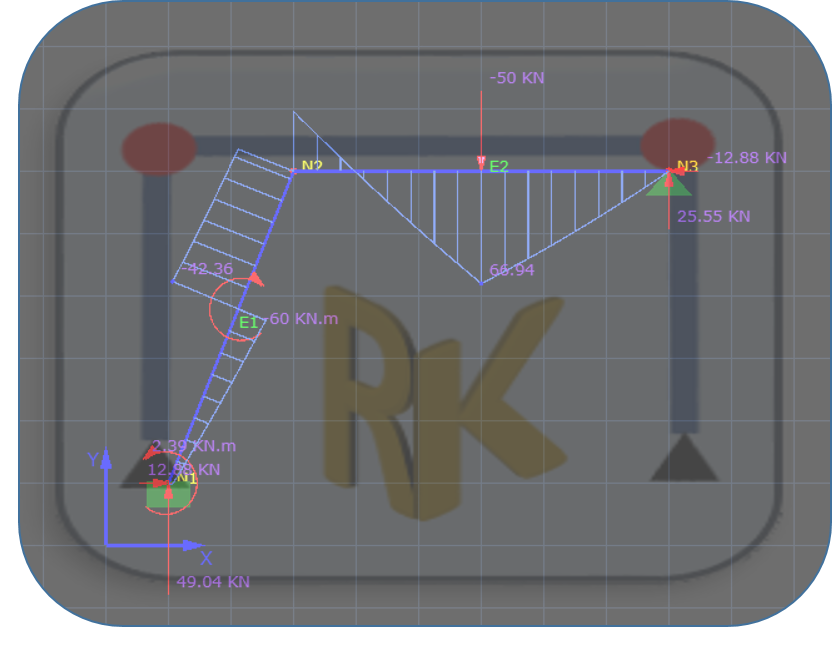
From Excel to C#: Introducing the New RKANALYSIS Frame Solver
RKANALYSIS is a standalone 2D Frame Analysis application designed specifically for Microsoft Windows. Built on the robust Direct Stiffness Method, this tool offers accurate and fast structural analysis for plane frames and beams.
Why this tool? I originally developed this application following a request from the community to migrate my legacy Excel-based solver into a full-fledged C# Windows Application. The result is a robust, high-performance tool that overcomes the limitations of Excel, offering a smoother user interface and faster calculation times.
Key Features
-
Comprehensive Analysis: Instantly calculate support reactions, bending moments, shear forces, axial forces, and joint displacements.
-
Interactive Visualizations: Automatically draw and inspect Bending Moment Diagrams (BMD), Shear Force Diagrams (SFD), Axial Force Diagrams (AFD), and Deflection shapes.
-
Complex Loading: Unlike simple calculators, you can apply an unlimited number of point loads and uniform distributed loads (UDL) on any element.
-
Professional Reports: Export your full analysis results directly to a Microsoft Word document for design reports.
Current Limitations
-
Rigid Joints Only: The solver is currently optimized for structures with rigid connections (Frames/Beams). Pin-jointed trusses are not yet supported.
-
Units: The program uses consistent units. No automatic unit conversion is available yet, so please ensure your input units are consistent (e.g., all in kN and meters).
What You Get (The Source Code)
By purchasing this application, you aren’t just getting a tool; you are getting a learning resource. The package includes the full C# Source Code. This is perfect for:
-
Engineers who want to understand the matrix stiffness method implementation.
-
Developers looking to manipulate the code or add new features like truss analysis or unit conversion.
Installation Guide
-
Download the zip file attached below.
-
Unzip the folder.
-
Navigate to the
Setupfolder. -
Double-click
setup.exe(orsetup.msi) and follow the on-screen instructions to install.
How to Use RKANALYSIS
I have created a complete video tutorial that walks you through the entire workflow, including:
-
Defining Geometry: Setting up nodes and coordinates.
-
Modeling: drawing elements and assigning supports.
-
Loading: Applying complex member loads and defining load combinations.
-
Analyzing: interpreting the diagrams and exporting the report.
Watch the Full Tutorial on YouTube: Tutorial